Class #1 (Tu):
Feb 11
|
Class:
- Introductions & class expectations
________________________________________________________
Assignments Due Today:
None
________________________________________________________
Homework:
None |
|
Class #2 (Th):
Feb 13
|
Class:
- Introduce Google Pages
- Introduce Homepage
- Worktime for Homepage
________________________________________________________
Assignments Due Today:
None
________________________________________________________
Homework:
- Complete rough draft of Homepage (final draft, online due Class #5)
Note: Photos will be taken next class so dress professionally |
Class #3 (Tu):
Feb 18
|
Class:
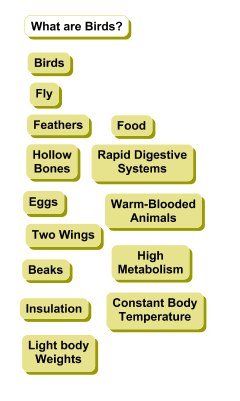
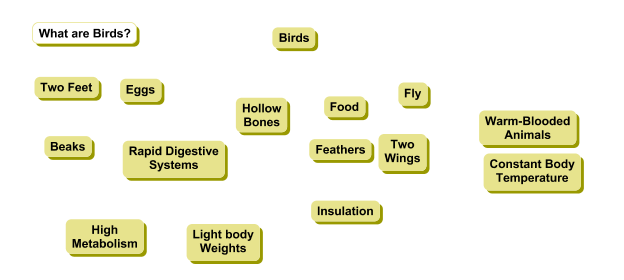
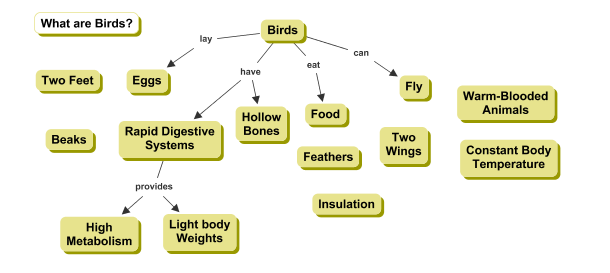
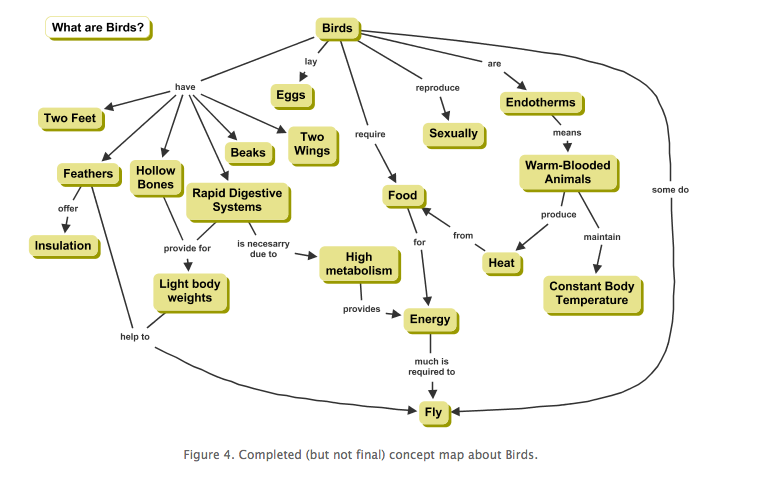
- Continuous development in technology knowledge; discuss a variety of media and educational technology to enrich learning opportunities: Concept Maps (Inspiration/Kidspiration)
- Example of step 1 in Concept Maps, click here
- Example of step 2 in Concept Maps, click here
- Example of step 3 in Concept Maps, click here
- Example of step 4 in Concept Maps, click here
- Introduce Majors Page
________________________________________________________
Assignments Due Today:
________________________________________________________
Homework:
- Majors Page, rough draft (final draft, online due Class #5)
- Self-report questionnaire for research study
|
Class #4 (Th):
Feb 20
|
Class:
- Editing digital images with Photoshop lesson (see "cheat sheet")
- Worktime for Homepage & Majors page
________________________________________________________
Assignments Due Today:
- Majors page, rough draft (final draft, online due Class #5)
- Self-report questionnaire for research study
________________________________________________________
Homework:
- Majors page, final draft, online
- Homepage, final draft, online
|
|
Class:
- Smartboard Introduction (identifying how to use Smartboard to enable learners with diverse backgrounds, characteristics, and abilities)
- Clickers/SENTIOs
- Discuss Smartboard Activity
________________________________________________________
Assignments Due Today:
- Majors page, final draft, online
- Homepage, final draft, online
________________________________________________________
Homework:
- SmartBoard Activity: (1) Identify if you would like to work with a partner; (2) Choose your topic for a 15 minute presentation; (3) Watch introductory SmartBoard videos (located in "Assignments" webpage for this course. Scroll down to Smartboard and the links to these videos will be in "What additional resources are available?)
|
|
Class:
- Review SmartBoard introductory videos
- Smartboard Overview and practice (with Notebook on individual computers)
________________________________________________________
Assignments Due Today:
- SmartBoard Activity: (1) Identify if you would like to work with a partner; (2) Choose your topic for a 15 minute presentation; (3) Watch introductory SmartBoard videos (located in "Assignments" webpage for this course. Scroll down to Smartboard and the links to these videos will be under "What additional resources are available?"
________________________________________________________
Homework:
- Smartboard activity: Begin to develop a plan for your 15 minute SmartBoard presenation
|
|
Class:
- Professional resumé discussion
________________________________________________________
Assignments Due Today:
- Smartboard activity: Begin to develop a plan for your 15 minute SmartBoard presenation
________________________________________________________
Homework:
- Resumé, rough draft
- SmartBoard Activity
|
|
Class:
- Electronic gradebooks
- Managing technology resourses and self-assessing use of these resources (including collecting and analyzing data, interpreting results, and communicating these findings to improve instructional practice)
- SmartBoard Presentation signup
______________________________________________________
Assignments Due Today:
________________________________________________________
Homework:
|
Class #9 (Tu):
March 11 |
Class:
- Uploading and hyperlinking documents to a website
- Creating PDFs (for resumé)
- SmartBoard worktime
- Professor feedback on resumé
______________________________________________________
Assignments Due Today:
________________________________________________________
Homework:
- Resumé, final draft (please bring a harcopy to next class AND upload/ hyperlink your resumé to your homepage)
- Smartboard activity
|
|
NO CLASS: Department Retreat
Suggestion: Work on SmartBoard presentation during class time
|
|
Class:
- Technology resources to enable and empower learners with diverse backgrounds (powerpoint), characteristics, and abilities
- Discuss Garageband: Sample Garageband (Emotions and Character Development in Harry Potter), click here.; Music in content areas such as Math, click here.
- Resources for diverse learners (Reading tools such as Kurzwil text-to-speach reading system)
- Midsemester evaluations
________________________________________________________
Assignments Due Today:
- Resumé, final draft (please bring a harcopy to class AND upload/ hyperlink resumé to your homepage)
________________________________________________________
Homework:
- SmartBoard Presentation and paper
|
Clas #12 (Th):
March 20
|
Class:
________________________________________________________
Assignments Due Today:
- SmartBoard Presentation and paper
________________________________________________________
Homework:
- SmartBoard Presentation and paper
|
|
Class:
________________________________________________________
Assignments Due Today:
- SmartBoard Presentation and paper
________________________________________________________
Homework:
- SmartBoard Presentation and paper
|
|
Class:
________________________________________________________
Assignments Due Today:
- SmartBoard Presentation and paper
________________________________________________________
Homework:
|
| Tues, April 1st |
NO CLASS: Spring Break |
| Thurs, April 3rd |
NO CLASS: Spring Break |
|
Class:
- Emerging Technologies I: Productivity Tools...Designing effective powerpoints based on cognitive theories (see powerpoint)
- Introduce Prezi (prezi.com)
- During class: Create a prezi account and develop a short prezi presentation to be shared in next class (in-class activity and application)
________________________________________________________
Assignments Due Today:
None
________________________________________________________
Homework:
- Create a prezi account and develop a short prezi presentation to be shared in next class (in-class activity and application)
|
|
Class:
- Small group discussions: Share prezi presentations
- Emerging Technologies II: "Adventure Learning" (recent research with Brian Honkomp) and "Second Life"
________________________________________________________
Assignments Due Today:
- Create a prezi account and develop a short prezi presentation to be shared in class
________________________________________________________
Homework:
- Twitter and Blog, and Wiki activity (Jigsaw approach): Assigned to one group (Twitter, Blog, or Wiki), research and be prepared to answer the following questions: 1. What is a twitter/blog/wikis? 2. How is a twitter/blog/wiki created? 3. How can twitter/blog/wiki be used in the classroom? 4. What are some challenges in intergrating twitter/blog/wikis in the classroom?
- See below for some resources to begin your research:
Twitter resources: Article #1, Article #2, Article #3, Article #4
Blog resources: Article #1, Article #2, Article #3
Wiki resources: Article #1, Article #2, Article #3
|
|
Class:
- Introduction to Bloom's Taxonomy and its relationship to thinking about educational technology
- Small group discussions for emerging technologies (III): Twitter, Blog, and Wiki activities
________________________________________________________
Assignments Due
- Twitter and Blog, and Wiki activity (Jigsaw approach): Assigned to one group (Twitter, Blog, or Wiki), research and be prepared to answer the following questions: 1. What is a twitter/blog/wikis? 2. How is a twitter/blog/wiki created? 3. How can twitter/blog/wiki be used in the classroom? 4. What are some challenges in intergrating twitter/blog/wikis in the classroom?
- See below for some resources to begin your research:
Twitter resources: Article #1, Article #2, Article #3, Article #4
Blog resources: Article #1, Article #2, Article #3
Wiki resources: Article #1, Article #2, Article #3
________________________________________________________
Homework:
- Watch introductory iPad in education video (click here) and Child trying to read a magazine like an iPad (click here)
Haven't used an iPad before (or use one infrequently):
- iPad User Guide: The Basics, short video (click here)
- iPad User Guide: The Basics, longer video (click here)
- Google Classrooms: Watch short video (click here)
|
|
|
Class:
- Emerging Technologies IV: iPads and iBooks (YouTube Video: Apple Education-Event iBooks); iPad Video from Elementary school ("Using iPads in Elementary School"); iPad from Secondary school ("New School: iPads and iPods in the classroom"); Child trying to read a magazine like an iPad (click here)
- Overview of iPads
- Overview of Google Classrooms
________________________________________________________
Assignments Due Today:
- Watch introductory iPad in education video (click here) and Child trying to read a magazine like an iPad (click here)
Haven't used an iPad before (or use one infrequently):
- iPad User Guide: The Basics, short video (click here)
- iPad User Guide: The Basics, longer video (click here)
- Google Classrooms: Watch short video (click here)
________________________________________________________
Homework:
- Prepare for discussion on Flipped Classrooms:
- Read these three short articles: Article #1, Article #2, Article #3.
- Watch these two short YouTube Videos (less than 5 minutues) on why teachers use flipped classrooms: Video #1, Video #2
- Think flipped classrooms won't work for younger elementary students? Think again! Watch these two short videos (less than 5 minutes): Video #1, Video #2
|
|
Class:
- Introduction to Flipped Classrooms
- Overview of Flipped Classroom Assignment
- Overview of Technology Page (will include link to video for Flipped Classroom Assignment)
- Begin planning topic for Flipped Class Video
________________________________________________________
Assignments Due Today:
- Prepare for discussion on Flipped Classrooms:
- Read these two short articles: Article #1, Article #2, Article #3.
- Watch these two short YouTube Videos (less than 5 minutues) on why teachers use flipped classrooms: Video #1, Video #2
- Think flipped classrooms won't work for younger elementary students? Think again! Watch these two short videos (less than 5 minutes): Video #1, Video #2
- Check out this site (click here) for pre-made videos that could be used in flipped classrooms
________________________________________________________
Homework:
- Decide topic and potential partners for video (Flipped Classroom Assignment)
|
|
Class:
- Discuss: (1) How to film video; (2) How to create video with Quicktime (using powerpoint and/or prezi presentations); (3) How to create Quicktime movies with embedded mac camera; (4) How to save unedited video to QuickTime and flashdisk
- Overview of next 3 classes and Flipped Classroom assignment
- Sign up for time to use camera to film video
________________________________________________________
Assignments Due Today:
- Decide topic and potential partners for video (Flipped Classroom Assignment)
________________________________________________________
Homework:
- Complete UNedited videos AND save unedited videos (in Quicktime) on Flashdisk for Flipped Class Assignment (unedited video needs to be completed in one week: Class #22)
|
Class #21 (T)
April 29th |
Class:
- Discuss iMovie and editing videos
- Introduce YouTube and linking video in Technology Page
- Worktime for Flipped Classroom Assignment: Create Technology Page (will embed link to YouTube video in this page)
________________________________________________________
Assignments Due Today:
________________________________________________________
Homework:
- Complete UNedited videos AND save unedited videos (in Quicktime) on Flashdisk for Flipped Class Assignment (due next class)
|
Class #22 (Th):
May 1st |
Class
- Worktime for Flipped Classroom assignment: (1) Edit videos in iMovie; (2) Export and upload to YouTube; (3) Link YouTube video to Technology Page
______________________________________________________
Assignments Due Today:
- Complete UNedited videos AND save unedited videos (in Quicktime) on Flashdisk for Flipped Class Assignment
______________________________________________________
Homework:
- Complete edited videos for Flipped Class Assignment, upload to YouTube, and linked to Technology Page
|
Class #23 (Tu):
May 6th |
Class:
- Share videos for Flipped Class Assignment
- Introduce Social, Ethical, and Legal issues related to technology
______________________________________________________
Assignments Due Today:
- Complete edited videos for Flipped Class Assignment, upload to YouTube, and linked to Technology Page
______________________________________________________
Homework:
|
|
Class:
- Social, Ethical, and Legal issues: Discuss social issues and cyberbullying article
- Create groups for social, ethical, and legal issues discussion (click here for an overview and guiding questions/resources)
________________________________________________________
Assignments Due Today:
_______________________________________________________
Homework:
- Begin to prepare for group presentations/discussions: Social, ethical, and legal issues related to technology
|
|
Class:
- Group work to prepare for class discussion: Social, ethical, and legal issues related to technology. (click here for an overview and guiding questions/resources)
________________________________________________________
Assignments Due Today:
________________________________________________________
Homework:
- Finalize preparation for group presentations/discussions: Social, ethical, and legal issues related to technology (in-class activity and application)
- Technology Page (due at assigned final time for EDU 241)
|
Class #26 (Th):
May 15th |
Class:
- Group presentations/discussion: Social, ethical, and legal issues related to technology (in-class activity and application)
________________________________________________________
Assignments Due Today:
- Prepare for the group presentations/discussions: Social, ethical, and legal issues related to technology (in-class activity and application)
________________________________________________________
Homework:
- Upload SmartBoard presentation (artifact) and paper (key assessment description and rationale) to TaskStream (Standard 6) OR create a new webpage (if you do not have a TaskStream account)
|
|
Class:
- Worktime: Upload SmartBoard presentation (artifact) and paper (key assessment description and rationale) to TaskStream (Standard 6) OR create a new webpage (if you do not have a TaskStream account)
- Review requirements for Technology Page
- End of the year evaluations
________________________________________________________
Assignments Due Today:
- Upload SmartBoard presentation (artifact) and paper (key assessment description and rationale) to TaskStream (Standard 6) OR create a new webpage (if you do not have a TaskStream account)
________________________________________________________
Homework:
- Technology page, final draft (Note: Technology page due at assigned final time for EDU 241)
- Upload SmartBoard presentation (artifact) and paper (key assessment description and rationale) to TaskStream (Standard 6) OR create a new webpage (if you do not have a TaskStream account)
|