In our projects, we make a distinction between creating and constructing objects. Creating an object requires no prior objects to exist. For example, if we use the Segment Tool (Under the Line Button) we can click and drag to create segments at will. Here we have created a segment f=AB and a point C. Suppose we want construct the perpendicular to f through C. This requires f and C to exist. The fourth button from the left in the Tool Bar is by default the Perpendicular Line tool. If we click on this button, we saw a drop-down list of other tools. All of these involve lines that are constructed from existing objects. Those existing objects are depicted in red.
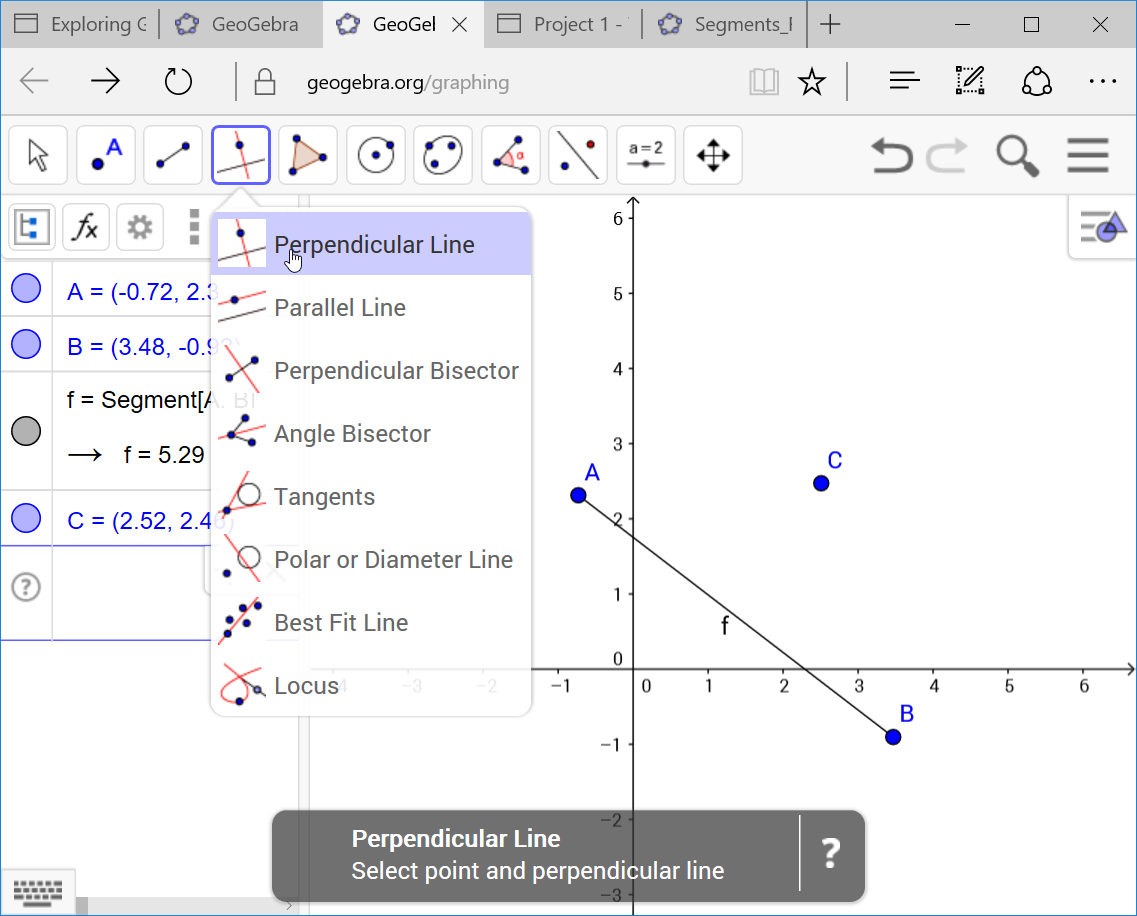
To construct the perpendicular, select the segment f. You will see a line perpendicular to f appear. Drag the cursor and click on C. The perpendicular to f through C is now constructed. The perpendicularity of this line will be dynamically updated as we move f or C. Select C and drag to move it around. The perpendicular will update accordingly. This dynamic updating is one of the prime strengths of dynamic geometry software.

To Learn More
If you want more general info on using GeoGebra, there are numerous on-line tutorials. A nice brief intro is at www.ms.uky.edu . The GeoGebra web site is the definitive reference.