Kotlin & Processing basics
Start: 10/3/2023
Due: 10/30/2023, by the beginning of class
Collaboration: individual
Important Links: [how to make your mac ready for MCS-178] [how to make your Linux machine ready for MCS-178] [style guidelines] [readme.txt] [gradesheet] [zip how-to] [zipped gradle project]
Overview
The goal of this assignment is to practice writing short Kotlin programs that
- use loops
- use conditional statements
- use the processing library functions
- process command line arguments
Before starting, download the zipped gradle project and expand it into your mcs178 directory. Study its content and make sure you know where to put the source files you’re supposed to write. Also make sure you know how to issue the gradle commands to compile and run your programs. We’ll demonstrate these commands in class.
The programs
Checkerboard. Make sure your terminal’s current working directory is in the project root directory. Use your text editor to write a program
./Checkerboard/src/main/kotlin/Checkerboard.ktthat takes an integer command line argument n, and uses a nested loop construct to output an n-by-n checkerboard pattern like the ones below:$ gradle -q :Checkboard:run --args=4

$ gradle -q :Checkboard:run --args=5

The convention is that the lower left corner square is always black. Note that your program must work correctly for any positive integer n, not just for n equal to 4 or 5. Additionally, your program should check that the user provides exactly one command line argument (as a positive integer) before continuing. If this condition is not met, the program should give an error message and abort.
Bears. This exercise has two parts.
Write a Kotlin program
./Bear/src/main/kotlin/Bear.ktthat draws a cute cartoon face of a bear like the following.$ gradle -q :Bear:run

By changing the arguments of all shape-drawing functions calls, turn your bear face drawing code into the function
fun bear1(x: Float, y: Float, w: Float, h: Float)so that when
bear1(x, y, w, h)is called, a bear face of widthw, heighthwill be drawn with its upper left corner at(x, y). For example, this example run
>$ gradle -q :Bears:run

results from the fact that the fileBears.ktcontains the linesize(800, 400)inside itssettings()definition, and the linesbear1(60F, 80F, 200F, 200F) bear1(260F, 20F, 200F, 150F) bear1(280F, 180F, 150F, 200F) bear1(450F, 40F, 300F, 300F)inside its
draw()definition.Now implement a function
fun bear2(x: Float, y: Float, w: Float, h: Float)by modifying the
Bear.ktcode so that callingbear2(x, y, w, h)works exactly likebear1(x, y, w, h). However,bear2should use thetranslateandscalefunctions, and retains most of the bear face drawing code fromBear.kt.
Random walks. A drone begins flying aimlessly, starting at Pittman Hall. At each time step, the drone flies one meter in a random direction, either north, east, south, or west, with probability 25%. How far will the drone be from Pittman Hall after n steps? This process is known as a two-dimensional random walk. It is a discrete version of a natural phenomenon known as Brownian motion. It serves as a scientific model for an astonishing range of physical processes from the dispersion of ink flowing in water, to the formation of polymer chains in chemistry, to cascades of neurons firing in the brain.
Write a Kotlin program
./RandomWalker/src/kotlin/RandomWalker.ktthat obtains an integernfrom its command line argument and simulates the motion of a random walk fornsteps. Draw the location point at each step (including the starting point), treating the starting point as the Cartesian Coordinates system origin (0, 0). Also, print the square of the final Euclidean distance from the origin. Here is an example run withn= 5000.$ gradle :RandomWalker:run --args=5000
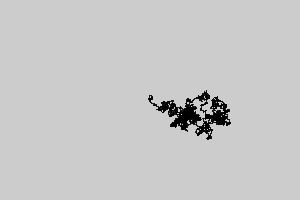
squared distance = 1250.0Make sure the program checks the command line argument(s) and gives appropriate error message if not exactly one argument is given.
Write a program
./RandomWalkers/src/kotlin/RandomWalkers.ktthat obtains two integersnandtrialsfrom its command line arguments. In each oftrialsindependent experiments, simulate a random walk ofnsteps and compute the squared distance (without using the processing library to display the points.). Output the mean squared distance (the average of thetrialssquared distances). Here are example runs of the program on various values ofnandtrials.$ gradle -q :RandomWalkers:run --args="100 10000" mean squared distance = 101.446 $ gradle -q :RandomWalkers:run --args="400 2000" mean squared distance = 383.12 $ gradle -q :RandomWalkers:run --args="100 10000" mean squared distance = 99.1674 $ gradle -q :RandomWalkers:run --args="800 5000" mean squared distance = 811.8264 $ gradle -q :RandomWalkers:run --args="200 1000" mean squared distance = 195.75 $ gradle -q :RandomWalkers:run --args="1600 100000" mean squared distance = 1600.13064As
nincreases, we expect the random walk to end up farther and farther away from the origin. But how much farther? Use the output fromRandomWalkersto formulate a hypothesis as to how the mean squared distance grows as a function ofn. Usetrials= 100,000 to get a sufficiently accurate estimate.Make sure the program checks the command line argument(s) and gives appropriate error message if not exactly two arguments are given.
Program style and format
Follow the guidelines in the Style Guidelines. Is your header complete? Did you comment appropriately? Is your code indented consistently? Did you use descriptive variable names? Did you follow the input and output specifications? Are there any redundant conditions?
Tips
I suggest you consult the processing reference page to learn about these functions and variables:
arc(., ., ., ., ., .)
dist(., ., ., .)
ellipse(., ., ., .)
fill(., ., .)
frameCount
height
noLoop()
popMatrix()
pushMatrix()
rect(., ., ., .)
line(., ., ., .)
random(.)
save(.)
size(., .)
scale(., .)
stop()
strokeweight(.)
translate(., .)
width
There are some processing functions that have the same or similar functionality as some kotlin functions. The point is that processing functions can only be called within the
PAppletclass. You have to use the builtin kotlin version if you want to call from outside thePAppletclass.
Gradesheet
We will use this gradesheet when grading your project.
Submission
You should create a “zip” archive file containing all Kotlin programs and your completed readme.txt file. Be sure to include the completed readme.txt file in your zip file. Read zip how-to if you do not know how to create a zip file. If you are going to zip up the whole basics directory, make sure you issue the command
$ gradle cleanin the project root directory before issuing the zip command in the directory containing the basics project. Ask your lab instructor for help if you need it. Submit the zip file via Moodle.