Class #1 (Tu):
Sep 2
|
Class (First Class):
- Introductions & class expectations
________________________________________________________
Assignments Due Today:
None
________________________________________________________
Homework:
None |
|
Class #2 (Th):
Sep 4
|
Class (Create your website!):
- Introduce Google Pages
- Introduce Homepage
- Worktime for Homepage
________________________________________________________
Assignments Due Today:
None
________________________________________________________
Homework:
- Complete rough draft of Homepage (final draft, online due Class #5)
|
Class #3 (Tu):
Sep 9
|
Class (Add to your website!):
- Editing digital images with Photoshop lesson (see "cheat sheet")
- Introduce Majors Page
- Worktime for Homepage & Majors page
________________________________________________________
Assignments Due Today:
________________________________________________________
Homework:
- Majors Page, rough draft (final draft, online due Class #5)
|
Class #4 (Th):
Sep 11
|
Class (Introduction to SmartBoard):
- Smartboard Introduction (identifying how to use Smartboard to enable learners with diverse backgrounds, characteristics, and abilities)
- Clickers/SENTIOs
- Discuss Smartboard Activity
________________________________________________________
Assignments Due Today:
- Majors page, rough draft (final draft, online due Class #5)
________________________________________________________
Homework:
- Majors page, final draft, online
- Homepage, final draft, online
- Watch introductory SmartBoard videos (located in "Assignments" webpage for this course. Scroll down to Smartboard and the links to these videos will be in "What additional resources are available?)
|
|
Class (SmartBoard, continued):
- Review SmartBoard introductory videos
- Smartboard Overview and practice (with Notebook on individual computers)
________________________________________________________
Assignments Due Today:
- Majors page, final draft, online
- Homepage, final draft, online
- Watch introductory SmartBoard videos: located in "Assignments" webpage for this course. Scroll down to Smartboard and the links to these videos will be under "What additional resources are available?"
________________________________________________________
Homework:
- SmartBoard Presentation: (1) Identify if you would like to work with a partner; (2) Choose your topic for a 15 minute presentation
|
|
Class (Resumé):
- Professional resumé discussion
- Worktime for resumé
________________________________________________________
Assignments Due Today:
- SmartBoard presentation: (1) Identify if you would like to work with a partner; (2) Choose your topic for a 15 minute presentation
________________________________________________________
Homework:
- Resumé, rough draft
- Smartboard presentation: Develop a plan for your 15 minute SmartBoard presenation
|
|
Class (SmartBoard Presentation worktime)
- Uploading and hyperlinking documents to a website; creating PDFs (for resumé)
- Overview of domain-specific homework
- SmartBoard worktime
- SmartBoard Presentation signup
________________________________________________________
Assignments Due Today:
- Resumé, rough draft
- Smartboard presentation: Plan your 15 minute SmartBoard presenation
________________________________________________________
Homework:
- Research domain specific technologies. Choose ONE of the below domains and complete the homework assignment, which is linked.
- Math: Click here.
- Social Studies: Click here.
- Music: Click here.
- Art: Click here.
- Science: Click here.
- English and Language Arts: Click here.
- Work on SmartBoard Presentation
|
|
Class (Domain specific technologies)
- Jigsaw approach to discussing domain-specific technologies
- Professor feedback on resumé (ask questions about feedback during class)
______________________________________________________
Assignments Due Today:
- Research domain specific technologies. Choose ONE of the below domains and complete the homework assignment, which is linked.
- Math: Click here.
- Social Studies: Click here.
- Music: Click here.
- Art: Click here.
- Science: Click here.
- English and Language Arts: Click here.
________________________________________________________
Homework:
- Resumé, final draft: Due Class #10 (please bring a harcopy to next class AND upload/ hyperlink your resumé to your homepage)
- Work on Smartboard Presentation
|
Class #9 (Tu):
Sep 30 |
Class (Assessment and Technology, I)
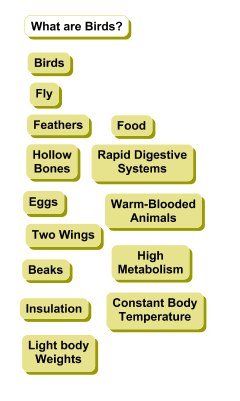
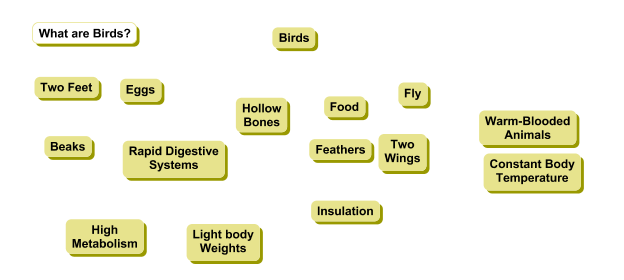
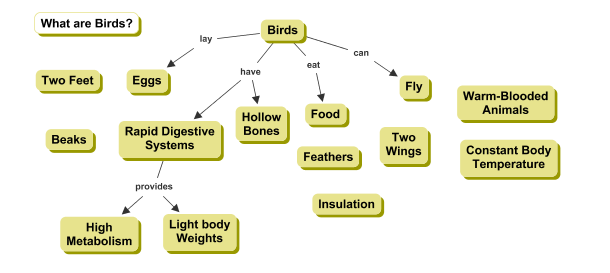
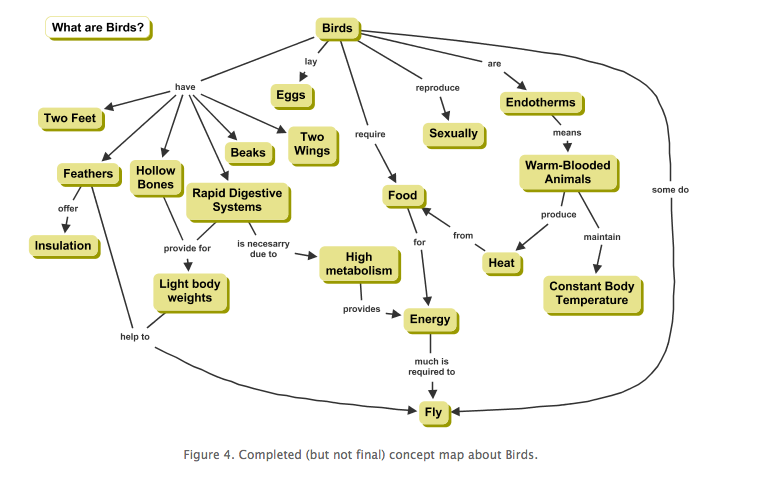
- Continuous development in technology knowledge; discuss a variety of media and educational technology to enrich and assess learning: Concept Maps (Inspiration/Kidspiration)
- Example of step 1 in Concept Maps, click here
- Example of step 2 in Concept Maps, click here
- Example of step 3 in Concept Maps, click here
- Example of step 4 in Concept Maps, click here
______________________________________________________
Assignments Due Today:
________________________________________________________
Homework:
- Resumé, final draft: Due Class #10 (please bring a harcopy to next class AND upload/ hyperlink your resumé to your homepage)
- Work on Smartboard Presentation
|
Class #10 (Th):
Oct 2 |
Class (Assessment and Technology, II)
- Electronic gradebooks (Managing technology resourses and self-assessing use of these resources, including collecting and analyzing data, interpreting results, and communicating these findings to improve instructional practice)
______________________________________________________
Assignments Due Today:
- Resumé, final draft (please bring a harcopy to class AND upload/ hyperlink your resumé to your homepage)
________________________________________________________
Homework:
- Smartboard presentations (presentations start in Class #12)
|
|
NO CLASS: Nobel Conference
Suggestion: Work on SmartBoard presentation
|
|
Class (Technology and diverse learners):
- Technology resources to enable and empower learners with diverse backgrounds (powerpoint), characteristics, and abilities
- Discuss Garageband: Sample Garageband (Emotions and Character Development in Harry Potter), click here.; Music in content areas such as Math, click here.
- Resources for diverse learners (Reading tools such as Kurzwil text-to-speach reading system)
- Midsemester evaluations
________________________________________________________
Assignments Due Today:
________________________________________________________
Homework:
- SmartBoard Presentation and paper
|
Clas #12 (T):
Oct 14
|
Class (SmartBoard presentations, I):
- SmartBoard presentation NOTE: Only those who are completing the informal presentation need to attend today's class. If you are not assigned to present today, then you do not need to attend. This plan is to accomodate the number of computers in our lab.
________________________________________________________
Assignments Due Today:
- SmartBoard Presentation and paper
________________________________________________________
Homework:
- SmartBoard Presentation and paper
|
|
Class (SmartBoard presentations, II):
- SmartBoard presentation NOTE: Only those who are completing the informal presentation need to attend today's class. If you are not assigned to present today, then you do not need to attend. This plan is to accomodate the number of computers in our lab.
________________________________________________________
Assignments Due Today:
- SmartBoard Presentation and paper
________________________________________________________
Homework:
- SmartBoard Presentation and paper
|
| Oct 21 |
NO CLASS: Reading Day |
|
Class (Bringing it all together)
- Evaluating lesson plans and their use of technology to enhance learning
________________________________________________________
Assignments Due Today: None
________________________________________________________
Homework:
|
|
Class (Emerging Technology I & II):
- Emerging Technologies I: Powerpoints and prezi: Designing effective powerpoints and prezi presentations based on cognitive theories (see powerpoint)
- Emerging Technologies II: Second Life
________________________________________________________
Assignments Due Today:
None
________________________________________________________
Homework:
- Write a 1 - 2 page double-spaced paper on possible applications of Second Life that address the following questions: (1) Do you think Second Life is more appropriate for different age groups? Why or why?; (2) Identify and describe one application of Second Life. In your description, please identify why you think this application would assist learning; (3) What challenges do you foresee in using Second Life in a K-12 classroom setting?
|
|
Class (Emergining Technology III):
- Small group discussions: Share applications of Second Life
- Emerging Technologies III: "Adventure Learning" (recent research with Brian Honkomp)
________________________________________________________
Assignments Due Today:
- Write a 1 - 2 page double-spaced paper on possible applications of Second Life that address the following questions: (1) Do you think Second Life is more appropriate for different age groups? Why or why?; (2) Identify and describe one application of Second Life. In your description, please identify why you think this application would assist learning; (3) What challenges do you foresee in using Second Life in a K-12 classroom setting?
________________________________________________________
Homework:
- Twitter and Blog, and Wiki activity (Jigsaw approach): Assigned to one group (Twitter, Blog, or Wiki), research and be prepared to answer the following questions: 1. What is a twitter/blog/wikis? 2. How is a twitter/blog/wiki created? 3. How can twitter/blog/wiki be used in the classroom? 4. What are some challenges in intergrating twitter/blog/wikis in the classroom?
- See below for some resources to begin your research:
Twitter resources: Article #1, Article #2, Article #3, Article #4
Blog resources: Article #1, Article #2, Article #3
Wiki resources: Article #1, Article #2, Article #3
|
|
Class (Bloom's Taxonomy and emerging technologies I):
- Introduction to Bloom's Taxonomy and its relationship to thinking about educational technology
- Small group discussions for emerging technologies (III): Twitter, Blog, and Wiki activities
________________________________________________________
Assignments Due
- Twitter and Blog, and Wiki activity (Jigsaw approach): Assigned to one group (Twitter, Blog, or Wiki), research and be prepared to answer the following questions: 1. What is a twitter/blog/wikis? 2. How is a twitter/blog/wiki created? 3. How can twitter/blog/wiki be used in the classroom? 4. What are some challenges in intergrating twitter/blog/wikis in the classroom?
- See below for some resources to begin your research:
Twitter resources: Article #1, Article #2, Article #3, Article #4
Blog resources: Article #1, Article #2, Article #3
Wiki resources: Article #1, Article #2, Article #3
________________________________________________________
Homework:
- Watch introductory iPad in education video (click here) and Child trying to read a magazine like an iPad (click here)
Haven't used an iPad before (or use one infrequently):
- iPad User Guide: The Basics, short video (click here)
- iPad User Guide: The Basics, longer video (click here)
- Google Classrooms: Watch short video (click here)
|
|
|
Class (Emerging technologies II):
- Emerging Technologies IV: iPads and iBooks (YouTube Video: Apple Education-Event iBooks); iPad Video from Elementary school ("Using iPads in Elementary School"); iPad from Secondary school ("New School: iPads and iPods in the classroom"); Child trying to read a magazine like an iPad (click here)
- Overview of iPads
- Overview of Google Classrooms
________________________________________________________
Assignments Due Today:
- Watch introductory iPad in education video (click here) and Child trying to read a magazine like an iPad (click here)
Haven't used an iPad before (or use one infrequently):
- iPad User Guide: The Basics, short video (click here)
- iPad User Guide: The Basics, longer video (click here)
- Google Classrooms: Watch short video (click here)
________________________________________________________
Homework:
- Prepare for discussion on Flipped Classrooms:
- Read these three short articles: Article #1, Article #2, Article #3.
- Watch these two short YouTube Videos (less than 5 minutues) on why teachers use flipped classrooms: Video #1, Video #2
- Think flipped classrooms won't work for younger elementary students? Think again! Watch these two short videos (less than 5 minutes): Video #1, Video #2
|
|
Class (Flipping classrooms I):
- Introduction to Flipped Classrooms
- Overview of Flipped Classroom Assignment
- Overview of Technology Page (will include link to video for Flipped Classroom Assignment)
- Begin planning topic for Flipped Class Video
________________________________________________________
Assignments Due Today:
- Prepare for discussion on Flipped Classrooms:
- Read these two short articles: Article #1, Article #2, Article #3.
- Watch these two short YouTube Videos (less than 5 minutues) on why teachers use flipped classrooms: Video #1, Video #2
- Think flipped classrooms won't work for younger elementary students? Think again! Watch these two short videos (less than 5 minutes): Video #1, Video #2
- Check out this site (click here) for pre-made videos that could be used in flipped classrooms
________________________________________________________
Homework:
- Decide topic and potential partners for video (Flipped Classroom Assignment)
|
|
Class (Flipping classrooms II):
- Discuss: (1) How to film video; (2) How to create video with Quicktime (using powerpoint and/or prezi presentations); (3) How to create Quicktime movies with embedded mac camera; (4) How to save unedited video to QuickTime and flashdisk
- Overview of next 3 classes and Flipped Classroom assignment
- Sign up for time to use camera to film video
________________________________________________________
Assignments Due Today:
- Decide topic and potential partners for video (Flipped Classroom Assignment)
________________________________________________________
Homework:
- Complete UNedited videos AND save unedited videos (in Quicktime) on Flashdisk for Flipped Class Assignment (unedited video needs to be completed in one week: Class #22)
|
Class #21 (T)
Nov 18 |
Class (Flipping classrooms III):
- Discuss iMovie and editing videos
- Introduce YouTube and linking video in Technology Page
- Worktime for Flipped Classroom Assignment: Create Technology Page (will embed link to YouTube video in this page)
________________________________________________________
Assignments Due Today:
________________________________________________________
Homework:
- Complete UNedited videos AND save unedited videos (in Quicktime) on Flashdisk for Flipped Class Assignment (due next class)
|
Class #22 (Th):
Nov 20 |
Class (Flipping classrooms IV)
- NOTE: editing, exporting, uploading, and linking video to Technology Page should be completed all at once (unless you are working on a personal computer). These steps could take as long as 2 hours. So, if you do not have time after class, you can complete these steps at different time (i.e. you do NOT need to come to class). Worktime for Flipped Classroom assignment: (1) Edit videos in iMovie; (2) Export and upload to YouTube; (3) Link YouTube video to Technology Page
______________________________________________________
Assignments Due Today:
- Complete UNedited videos AND save unedited videos (in Quicktime) on Flashdisk for Flipped Class Assignment
______________________________________________________
Homework:
- Complete edited videos for Flipped Class Assignment, upload to YouTube, and linked to Technology Page
|
Class #23 (Tu):
Nov 25 |
Class (Flipping classrooms V):
- Share videos for Flipped Class Assignment
- Social, ethical, and legal issues related to technology: Introduction
- Assigned to one of four articles (see Homework)
______________________________________________________
Assignments Due Today:
- Complete edited videos for Flipped Class Assignment, upload to YouTube, and linked to Technology Page
______________________________________________________
Homework (assigned to read articles from ONE of the below topics):
- Topic #1: Ethical Issues in Technology
- Freedom of Speech (click here and click here)
- Privacy (click here)
- Academic dishonesty (click here)
- Topic #2: Legal Issues in Technology
- Copyright and fair use (click here)
- Privacy (click here)
- Acceptable Use (click here)
- Software piracy (click here)
- Topic #3: Social Issues in Technology
- The digital divide (click here)
- Cyberbullying (click here and click here)
- Online/Social interactions (click here)
|
| Nov 27 |
NO CLASS: Thanksgiving Break |
|
Class (Social, ethical, and legal issues I):
- Jigsaw apporach: Discuss four articles
- Social, ethical, and legal issues related to technology activity introduced (click here for an overview)
________________________________________________________
Assignments Due Today:
- Topic #1: Ethical Issues in Technology
- Freedom of Speech (click here and click here)
- Privacy (click here)
- Academic dishonesty (click here)
- Topic #2: Legal Issues in Technology
- Copyright and fair use (click here)
- Privacy (click here)
- Acceptable Use (click here)
- Software piracy (click here)
- Topic #3: Social Issues in Technology
- The digital divide (click here)
- Cyberbullying (click here and click here and click here)
- Online/Social interactions (click here)
_______________________________________________________
Homework:
- Identify resources for social, ethical, and legal issues related to technology activity
|
|
Class (Social, ethical, and legal issues II):
- Worktime for social, ethical, and legal issues related to technology activity
________________________________________________________
Assignments Due Today:
- Identify resources for social, ethical, and legal issues related to technology activity
________________________________________________________
Homework:
- Finalize preparation for group presentations/discussions: Social, ethical, and legal issues related to technology
|
Class #26 (T):
Dec 9 |
Class (Social, ethical, and legal issues III):
- Presentations/discussion: Social, ethical, and legal issues related to technology
- TaskStream and uploading SmartBoard presentation, writing description and rationale (or create WebPage)
________________________________________________________
Assignments Due Today:
- Finalize preparation for presentations/discussions: Social, ethical, and legal issues related to technology
________________________________________________________
Homework:
- Upload SmartBoard presentation (artifact) and paper (key assessment description and rationale) to TaskStream (Standard 6) OR create a new webpage (if you do not have a TaskStream account)
|
|
Class (Last Class):
- Introduce Technology Page
- Worktime: Upload SmartBoard presentation (artifact) and paper (key assessment description and rationale) to TaskStream (Standard 6) OR create a new webpage (if you do not have a TaskStream account)
- End of the year evaluations
________________________________________________________
Assignments Due Today:
- Upload SmartBoard presentation (artifact) and paper (key assessment description and rationale) to TaskStream (Standard 6) OR create a new webpage (if you do not have a TaskStream account)
________________________________________________________
Homework:
- Technology page, final draft (Note: Technology page due at assigned final time for EDU 241)
- Upload SmartBoard presentation (artifact) and paper (key assessment description and rationale) to TaskStream (Standard 6) OR create a new webpage (if you do not have a TaskStream account)
|